May 20th, 2026
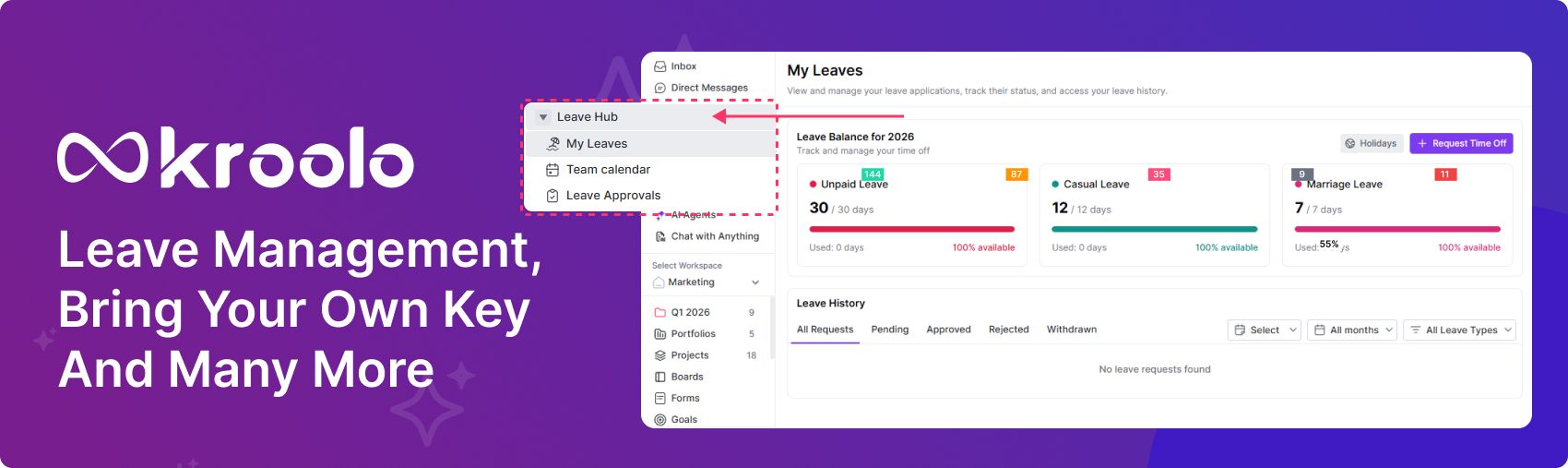
Leave Management, Bring your own key and many more
New Features
AI Configuration BYOK (Bring Your Own Key) functionality: With BYOK (Bring Your Own Key) via Akeyless, you can securely manage encryption keys under your control. This enables you to activate and run your own LLM module directly within Kroolo’s AI configuration for tailored responses
Leave Management: The Leave Hub Module in Kroolo centralises all leave requests, approvals, and tracking in a single unified space. Team members can easily apply for time off, while managers review and approve requests with full visibility. Integrated calendars ensure that leave schedules align with project timelines, preventing resource conflicts.
Attendance Feature: The Attendance feature allows team members to record their working hours by clocking in at the start of the day and clocking out at the end of the day. This ensures accurate tracking of daily presence, overtime, and productivity. Managers gain real‑time visibility into attendance patterns, helping them monitor punctuality, manage workloads, and maintain compliance with organisational policies.
My Space: The My Space Module allows you to seamlessly sync your tasks, events, and schedules with both Google and Outlook calendars. This integration ensures that all updates in Kroolo automatically reflect in your personal calendar, keeping you aligned across platforms. By connecting calendars, you gain real‑time visibility into deadlines, meetings, and leave schedules, helping you stay organised and avoid conflicts without switching between tools.
Docs: The new Collections feature in Kroolo Docs lets you group related documents together for easier organisation and quick access. Instead of searching across multiple files, you can create collections to keep project notes, references, and drafts in one place. This helps teams maintain structure, streamline collaboration, and ensure that important information is always centralised and easy to find.
Docs: The Knowledgebase in Kroolo Docs serves as a centralised repository where teams can store, organise, and access important information. It allows you to capture FAQs, best practices, and reference materials in one structured space, making it easy for members to find answers quickly. By consolidating knowledge, the section improves collaboration, reduces repetitive queries, and ensures that critical insights remain accessible and up to date
Enhancements
ADO integration: The ADO Epic–Task Linking feature allows teams to establish direct relationships between epics and their associated tasks. This improves traceability by ensuring every task is connected to its parent epic, making sprint planning more structured and transparent. Managers and team members gain better visibility into progress, dependencies, and workload alignment, reducing confusion and enhancing project tracking across the board.
Projects: The Configure Column and Formula Builder feature in Kroolo Projects lets you customise project columns and create formulas tailored to your workflow. You can define specific data fields, apply calculations, and automate reporting directly within your project view. This flexibility ensures teams capture the right information, streamline processes, and maintain accuracy across dashboards and reports
Integrations: The Project Incremental Sync ensures that only the latest changes are updated when syncing with connected integrations like Asana, Jira, or ClickUp. This reduces processing time and avoids duplicating data, keeping projects consistently aligned across platforms. By updating incrementally, teams maintain real‑time accuracy while minimising system load, ensuring smoother collaboration and faster sync cycles.
Sprints: Added Share View for Epic, All Epics, and All Sprints. The new Share View option allows teams to easily share visibility of individual epics, all epics, or all sprints across a project. This ensures that members can collaborate with full context, accessing progress and details without switching between multiple dashboards. By centralising shared views, it improves transparency, reduces duplication, and keeps everyone aligned on goals and timelines.
Bugs
Projects: The drag‑and‑drop persistence issue in Projects has now been resolved. Tasks will consistently retain their new positions after being moved, ensuring smoother navigation and reliable workflow organisation. This fix improves accuracy in task placement and eliminates the frustration of changes not saving properly.
Global settings: The recent enhancements to Kroolo Auth/User Management have resolved member invitation sync issues, ensuring smoother onboarding and consistent access across organisations. These improvements strengthen authentication flows, streamline user management, and provide a more reliable experience when inviting or managing team members.
Inbox: The issue where the Reminder Centre displayed incorrect due date messages for overdue tasks in the inbox has been resolved. Now, overdue tasks show the correct due dates, ensuring clarity and accurate tracking. This fix improves reliability in task reminders and helps teams stay aligned with deadlines without confusion.
Projects: Recent production issues across projects, sprints, and boards have been identified and resolved to ensure smoother performance. These fixes improve stability, eliminate workflow disruptions, and provide teams with a more reliable experience when managing tasks and tracking progress.
Portfolio: The Consolidate View Column Options feature allows you to unify and manage column settings across projects, sprints, and boards. This ensures consistency in how data is displayed, reduces duplication, and makes it easier for teams to maintain structured views across different modules.
Sprints: The issue with epic archiving has been fixed, ensuring archived epics are properly managed without disrupting active workflows. Additionally, when a sprint is marked complete, it now correctly reflects in the All Sprints view, providing accurate visibility and streamlined tracking across projects.
My Space: The issue where tasks from deleted projects continued to appear in the My Space module has been resolved. Now, once a project is deleted, its associated tasks are automatically removed from My Space, ensuring a clean and accurate workspace view. This fix improves task management clarity and prevents confusion by keeping only active, relevant tasks visible.
Settings: The Redirect URL enhancement ensures that when users click the link in a Create Project mail, they are taken directly to the relevant project setup page. This streamlines onboarding by removing extra navigation steps and provides a smoother, more intuitive experience. It helps members quickly access and configure new projects without confusion or delays
Projects: When editing a column name, a loader is now displayed until the update is completed. This ensures users receive clear visual feedback that the change is in progress, preventing confusion or duplicate actions. The improvement makes column updates more reliable and transparent within projects.